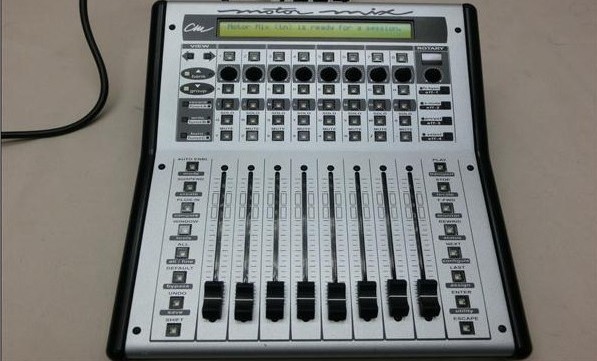
CM Labs Motormix Control Surface 音频控制台
- 设备类型:
- 媒体价格: ¥2800元
- 产品状态: 暂无
- 联系人: 声光社
-
联系方式:
手机 18610202320 即时通讯 2 149861774
详细介绍
The advent of computer-based DAWs has brought not only incredible power and complete recall of all internally controlled functions—effects, EQ, edits, level and mute—but it has also made the threat of repetitive stress injuries very real. With this in mind, and given the convenience of its fingertip moving fader control, I was anxious to review CM Labs' MotorMix with my Soundscape workstation. The unit is also supported by Digidesign (Pro Tools TDM and Digi 001/Pro Tools LE); Emagic Logic Audio; Steinberg Nuendo and VST; MOTU Digital Performer; Minnetonka MX-Trax; SEK'D Samplitude; and Symbolic Sound Kyma.
The first thing you'll notice about MotorMix is its rock-solid feel. From the full-throw 100mm faders to the 40-column by two-row alphanumeric display, the unit feels totally pro with no "flexing" of any kind when a switch is pressed. A quick peek under the hood reveals high-quality Fiberglas-epoxy circuit boards with plenty of support. This is not a disposable product but one that can grow with your needs. CM Labs also makes "Dashboard," a dedicated transport controller with a large jog/shuttle wheel.
MotorMix connects to your workstation via MIDI in and out ports. (There is also a 9-pin accessory connector.) Some workstations support multiple MotorMix units—Pro Tools accepts up to four. Workstation manufacturers are responsible for supplying the appropriate drivers. For example, Console Manager is the Soundscape applet that allows users to select MotorMix from a list of supported controllers. Within Soundscape's Settings menu is a user option to boot Console Manager along with the workstation. Once this is done the first time, simply select "Save Settings" and it becomes transparent.
Table 2: DETAILS OF FUNCTIONS ACTIVATED BY SOFT KEYS SHIFT-F1 TO SHIFT-F3
Rew: Puts recorder into Rewind mode
FF: Puts recorder into Fast Forward mode
Stop: Stops the recorder
Play: Puts recorder into Play mode
Rec: Puts recorder into Record mode
Pin: Controls punch-in flag
Pout: Controls punch-out flag
Loop: Controls loop flag DrLl: Drop left locator on current locator position
DrRl: Drop right locator on current locator position
GtLl: Move current locator to left locator
GtRl: Move current locator to right locator
GtAs: Move current locator to start of arrangement
GtAe: Move current locator to end of arrangement ZHIn: Zoom arrangement window horizontal in
ZHOut: Zoom arrangement window horizontal out
ZVIn: Zoom arrangement window vertical in
ZVOut: Zoom arrangement window vertical out
ScLe: Scroll arrangement left
ScRi: Scroll arrangement right
ScUp: Scroll arrangement up
ScDo: Scroll arrangement down
| Bank=8 | Track 1 | Track 2 | Track 3 | Track 4 | Track 5 | Track 6 | Track 7 | Track 8 | Upper Row |
| Group=4 | Track 5 | Track 6 | Track 7 | Track 8 | Track 9 | Track 10 | Track 11 | Track 12 | |
| Shift-F1 | Rew | FF | Stop | Play | Rec | Pin | Pout | Loop | Lower Row |
| Shift-F2 | DrLl | DrRl | GtLl | GtRl | X xxx | Xxxx | GtAs | GtAe | |
| Shift-F3 | ZHIn | ZHOut | ZVin | ZVOut | ScLg | ScRc | ScUa | ScDe | |
| Buttons | 1 | 2 | 3 | 4 | 5 | 6 | 7 | 8 | |
| Table 1: On the upper row, the LCD will indicate track names from the mixer. On the lower row are three sets of examples of what can be seen, plus the buttons activated immediately below. (See Table 2 for the complete detail of these functions.) | |||||||||